Poker Forum
|
Over 1,246,000 Posts!
|
|
|
>
>
A Beginner's Guide to Multi-Tabling by Nakamura and Rage2100
|
|
|
Rage2100
|
05-28-2009, 08:43 PM
Post subject: A Beginner's Guide to Multi-Tabling by Nakamura and Rage2100
|
#1 (permalink)
|
|
Full House
Join Date: Jan 2007
Location: UK
Posts: 719
|
|
INTRODUCTION
A short while ago, Nakamura posted a $2000 profit thread on FTR. In it, there was a brief section on multi-tabling containing some AHK code, written by myself, which was designed to make multi-tabling much easier for the average player. After some feedback, and a few players seemingly having a lot of trouble with the more technical aspects, we (Nakamura and Rage2100) decided to write a clearer and more detailed post, to help the average player play more tables. This thread is a joint effort and we hope you like it.
In this thread, we will describe how to set up your computer to run tables in a stacked formation, that is, one table on top of another table. We appreciate there are other ways of multi-tabling, such as cascading or tiling, but we believe this method is the best way to play 10+ tables at once, for a variety of reasons. Firstly, you will mostly be folding and you will therefore usually not have to move the mouse at all. This will save your neck and wrists from strain. Additionally, both tiling, and to a lesser extent cascading, have a point where adding more tables makes no sense, either because the table size is too small or you have run out of space to add to your cascade. In theory, you could add infinite tables to a stack, although we definitely don't recommend this!
We intend this guide to users who play at Poker Stars and Full Tilt Poker. The primary reason for this is the software needs to have the ability to queue the tables. This means that tables that require action will not pop up until you have acted on the most urgent table first.
Finally, we don't intend that you start stacking 10 tables at once. You WILL initially find the concept of stacking foreign, and somewhat different. Both of us started out stacking what we were comfortable tiling, and built up the number of tables from there. We suggest you do the same.
DEFINITIONS
We believe it makes sense to define the terms we use throughout the thread before we actually use them. Please familiarise yourself with these terms before you read the rest of the post.
AutoHotKey (or AHK) - A powerful open-source software for Windows, which allows you to automate and assign hotkeys to certain keystrokes or mouse actions.
Hotkey – A keyboard key that can be programmed to perform a certain action, by a certain program (in this case AHK).
Main Stack – The main group of tables, which run one on top of another.
MoveTable.ahk – An AHK script, which allows the user to move a particular table in and out of a stack with a certain key press (currently set to Spacebar). There are different versions available for download, depending on your table configuration and the poker site you play at. These have slightly different endings to the filenames, but when we refer to MoveTable.ahk, we are referring to the .ahk file that begins, MoveTable.
Script – Computer code that contains a list of commands, which are executed by a certain program (in this case AHK).
SetTable.ahk – An AHK script desiged to help users exactly replicate their table size on multiple tables. There are different versions available for download, depending on your table configuration and the poker site you play at. These have slightly different endings to the filenames, but when we refer to SetTable.ahk, we are referring to the .ahk file that begins, SetTable.
Slots - The available spaces to shift your tables to if you need to follow the action a bit more closely on a particular table. Tables will always be put into the slot with the lowest number (if available) i.e. first slot 1, then slot 2, then slot 3.
IMPORTANT NOTE: Throughout the post we will refer to accessing menu structures. We will write this as Poker Stars Lobby -> Options -> Advanced Multi-Table Options. We mean, go to the Poker Stars Lobby, click on the Options menu, and then click on Advanced Multi-Table Options.
When we say press Ctrl-h, we mean hold the "Control" key and the "h" key at the same time.
BEFORE YOU START
Please make sure you have the following multi-table options set up at Poker Stars or Full Tilt.
For Poker Stars:
Poker Stars Lobby -> Options -> Advanced Multi-Table Options
Make sure the following two boxes are ticked:
Popup table whenever user action is required
Single click table activation
For Full Tilt:
Full Tilt Lobby -> Options -> Display Table on Action
DOWNLOADING AND INSTALLING AUTOHOTKEY
In order to run the necessary scripts to use the multi-tabling code, you will first need to download and install AutoHotKey.
1. Open your internet browser and go to:
AutoHotkey - Free Mouse and Keyboard Macro Program with Hotkeys and AutoText
2. Click on "Download", and then click on "AutoHotkey Installer".
3. Click "Run" and follow the onscreen instructions. AutoHotkey will be installed on your computer. It will usually be installed to the directory: C:\Program Files\AutoHotkey\
4. Create a separate folder for your AHK scripts. It makes sense to create a separate folder in the AutoHotkey directory for each set of scripts that you will be using. For example, you can create a directory called MoveTable, where both of the scripts you will be using later, can be copied to. The path for this directory will then be: C:\Program Files\AutoHotkey\MoveTable\
IMPORTANT NOTES FOR VISTA USERS: If you are using Windows Vista, and are having problems, please make sure you are logged in as "Administrator". Copy the "MoveTable.ahk" and "SetTable.ahk" scripts to a directory under your "User" section, and not to the C:\Program Files\AutoHotkey\ directory. When the ".ini" file is created, the system may need certain privileges, so your "User" section will be the best place.
Also, with Vista, certain AHK scripts require you to run AutoHotkey with administrator privileges. To set this up, please follow the steps below.
1. Right-click the "AutoHotkey.exe" file, under C:\Program Files\AutoHotkey\ where it is installed by default. If you have a shortcut icon to AutoHotkey on your desktop, you can right-click that instead.
2. From the right-click menu, choose "Properties".
3. Click on the "Compatibility" tab.
4. At the bottom of the tab, is a section called "Privilege level". Tick the box that says "Run this program as an administrator".
5. Click "Apply".
6. Click "Ok".
All scripts should now run as administrator.
DOWNLOADING AND COPYING THE SCRIPTS
There are two scripts that need to be copied into the directory that you created above, so please read this section before downloading. The download link is at the end of this section.
Two different configurations are supported, and these are available for both Poker Stars and Full Tilt Poker. You will need to download the correct scripts depending on where you want your main stack to be positioned, and which poker site you play at. The table configuration is a matter of personal preference, and is detailed below.
Configuration 1
The main stack in an upper left position, with slot 1 in the upper right, slot 2 in the lower right, and slot 3 in the lower left, as shown in the screenshot below.

Configuration 2
The main stack in a lower right position, with slot 1 in the upper right, slot 2 in the upper left, and slot 3 in the lower right, as shown in the screenshot below.

IMPORTANT NOTE: Your tables must be in the correct positions in relation to the other tables, but they do not have to be touching as we have them shown in the screenshots above. You can have a space between your tables, or if you are running on a small laptop screen, the tables can be overlapping slightly.
All files can be downloaded from here:
FTR - http://www.flopturnriver.com/ahk-scripts.zip
Media Fire - Free Cloud Storage - MediaFire
If using Configuration 1 on Full Tilt, please download the following two files:
MoveTable_Config1_FT.ahk
SetTable_Config1_FT.ahk
If using Configuration 2 on Full Tilt, please download the following two files:
MoveTable_Config2_FT.ahk
SetTable_Config2_FT.ahk
If using Configuration 1 on Poker Stars, please download the following two files:
MoveTable_Config1_PS.ahk
SetTable_Config1_PS.ahk
If using Configuration 2 on Poker Stars, please download the following two files:
MoveTable_Config2_PS.ahk
SetTable_Config2_PS.ahk
ADDITIONAL STEP FOR POKER STARS USERS
Note: Full Tilt Poker tables do not appear to suffer from this problem, and this section can be skipped if you are using this guide to multi-table at Full Tilt Poker.
When using the "SetTable.ahk" script in the next step, if a Poker Stars window is made smaller than the default size, the window border will resize, but the table will not, giving the odd effect shown in the screenshot below.

This effect does not happen if the tables are manually resized, but unfortunately will occur using the SetTable script. Follow the steps below to resolve the bug.
1. Open Poker Stars.
2. Navigate to Poker Stars Lobby -> Help -> Open My Settings Folder
3. In the window that opens with all your user settings, double-click on "user.ini" and it will open in Notepad.
4. In the top section, under "[Options]", the following line needs to be added:
f5redrawtable=1
This is shown in the screenshot below.
5. Save the file, and close Poker Stars.
USING THE SET TABLE SCRIPT
If you have already set up your table sizes and have them saved as a custom layout, feel free to skip this section, but please read the section, "Entering Your Co-Ordinates Manually".
1. Navigate to your AHK script folder and double-click on the "SetTable.ahk". A green "H" should appear in your taskbar, next to the clock at the bottom right of your screen.
2. Open Poker Stars or Full Tilt Poker, and Log In.
3. Double-click on any Sit-and-Go in the lobby (preferably ones that fill up quickly), and wait until the table has filled up.
4. Click "Observe Table".
5. Repeat steps 3 & 4 so that you have as many tables open as you are planning to stack, i.e. if you plan to stack 10 tables, open 10 observed tables this way.
6. Move one of the tables to where you want your main stack to be.
IMPORTANT NOTE: The next three screenshots show the main stack in the upper left position, which is its position if you are using Configuration 1. If you are using Configuration 2, the main stack will be in the lower right position instead.
7. Pressing Crtl-h will move the active window to the upper left position.
IMPORTANT NOTE: Users running dual monitors will need to modify the "Origin_X" and "Origin_Y" settings near the top of the script to suit their monitor set-up. Please read the section, "Entering Your Co-Ordinates Manually", to see how to manually edit the script.
8. Resize the table window you just moved, until you have it the size you want it.
9. With this window still active, press Ctrl-g to record the position and size of it.

10. Hover the mouse (i.e. mouse-over) any of the other tables, press Ctrl-Spacebar, and that table will move and resize itself to match your main table.

11. Repeat step 10 for all of your tables, until you have them stacked one on top of another.
12. For Poker Stars - Save this as a custom layout:
Poker Stars Lobby -> View -> Save Custom Layout, and give it a name, "stacked", or another name you choose.
For Full Tilt Poker – Save this as a custom layout:
Full Tilt Poker Table -> Layout -> Manage Custom Layouts -> Save Custom Layout (after picking a slot).
13. Click on your main stack of tables. Use the keystrokes Ctrl-up, Ctrl-down, Ctrl-left, or Ctrl-right to select and move your tables, until you have 4 tables in a quadrant. Only one table needs to be moved into each slot at this point.

14. If you want a slight space between your tables, or you want your tables slightly overlapping, Shift-up, Shift-down, Shift-left, or Shift-right can be used to nudge the tables 10 pixels in the desired direction.
15. The next step will save the positions of the main stack and the slots, but is slightly different depending on whether you are using Configuration 1 or Configuration 2. You will need to press Ctrl-F1, Ctrl-F2, Ctrl-F3, and Ctrl-F4 for both configurations, but on slightly different tables. Please follow the steps on the screenshots for your chosen Configuration. The tables can be left-clicked in any order, but make sure you do all four.
If Using Configuration 1

If Using Configuration 2

16. Press Crtl-s to save all of these settings to a file called "MoveTable_ConfigX_XX.ini", which will automatically be created in the same directory as the two scripts. This step is needed so that "MoveTable.ahk" has access to the co-ordinates. Make sure an ".ini" file has been created before you go to the next step.
17. Close "SetTable.ahk" by right-clicking on the green "H" in the taskbar, and selecting "Exit".
18. Close the Poker Lobby.
Now that you have your tables lined up and saved as a custom layout in either Poker Stars or Full Tilt, and all of the co-ordinates stored in your ".ini" file, you will not need to use the "SetTable.ahk" script again, unless you wish to change and re-save your table positions.
ENTERING YOUR CO-ORDINATES MANUALLY
IMPORTANT NOTE: If you followed the "Using The Set Table Script" section above, you can skip this section, as your co-ordinates will automatically be stored in your ".ini" file.
To manually enter table co-ordinates, right-click on the "MoveTable.ahk" script, and select "Edit Script". The co-ordinates of your tables need to be entered near the top of the script, as shown below. X_home and Y_home are the X and Y co-ordinates of the main stack, and the other co-ordinates are the X and Y co-ordinates of your three slots.

INTRODUCTION TO THE MOVE TABLE SCRIPT
Unlike other multi-tabling options, such as tiling, when you stack, you will not be able to follow the action on every table. Sometimes, you will want to follow the action on a certain table, either because something interesting is happening or you are involved in a hand. "MoveTable.ahk" allows you to move a table out of the main stack and into any available slot on your screen with one push of the Spacebar. Spacebar also moves the table back into the main stack again.
TESTING THE MOVE TABLE SCRIPT
This part is a test to check that everything is set up correctly and functioning properly before you commit to multi-tabling on real money tables.
1. Open Poker Stars or Full Tilt Poker.
2. Ensure your custom, stacked layout is selected on Poker Stars or Full Tilt, so when the tables are opened, they will all open one on top of another, where your main stack should be.
3. Navigate to your AHK script folder, and double-click on "MoveTable.ahk". This places a green "H" in the taskbar.
4. Double-click on any Sit-and-Go in the lobby, and wait until the table has filled up.
5. Click "Observe Table".
6. Repeat steps 4 & 5 so that you have at least 4 tables open. This is enough to give you a good idea of how the script works.
7. Once all the tables are open, your screen should look like the screenshot below, with all tables stacked on top of each other.
IMPORTANT NOTE: If you are using Configuration 2, the main stack will be in the lower right position instead.

8. Mouse-over the main stack and press the Spacebar. The table on the top of the stack should move into slot 1, as shown in the screenshot below. NOTE: You do not need to click on the table, just move the mouse over it.

9. Press the Spacebar again, while the mouse is positioned over the main stack. The top table in the main stack will move into the next available slot, i.e. slot 2.

10. Press the Spacebar again while mousing over the main stack. The top table will move to slot 3.

11. Press the Spacebar while mousing over slot 2, and the table should move back to the main stack, leaving slot 2 empty.

12. If you now press Spacebar while mousing over the main stack, the program knows slot 2 is empty, and will move the table there.
13. Press the Spacebar while mousing over the three tables in the slots to move them back into the main stack.
That concludes your test. You should now have a basic understanding of how the code works. If you have found something has not worked properly, please make sure you have set up your tables correctly using "SetTable.ahk", and have followed the instructions carefully.
USING THE MOVE TABLE SCRIPT WITH LIVE TABLES
1. Open Poker Stars or Full Tilt Poker.
2. Ensure your custom, stacked layout is selected on Poker Stars or Full Tilt, so when the tables are opened, they will all open one on top of another, where your main stack should be.
3. Navigate to your AHK script folder, and double-click on "MoveTable.ahk". This places a green "H" in the taskbar.
4. Open however many Sit-and-Go lobbies you plan to multi-table, and enter the tournaments.
5. If there is action on a table you wish to follow, press the Spacebar to move the table into the next available slot.
IMPORTANT NOTE: If you are using a HUD, please make sure your mouse is not over a HUD stat when you press Spacebar. Otherwise, your table will not move.
6. Press the Spacebar while the mouse is positioned over the table, to move it back into the main slot, when you are finished watching the table.
Personally, we both like to move tables on which we are involved, out of the main stack. For example, Hero is dealt KK. Hero moves the table out of the main stack before raising to 120 chips. We find this helps us to remember the order of actions, e.g. did we raise or call, and gives us a little bit more time to consider our post-flop plays.
IMPORTANT NOTE: If you get eliminated from a table while the table is in the main stack, you can close that table normally, with the "X" in the corner of the window. However, if you get eliminated from a table while it is in one of the slots, closing the table normally may confuse the script counter. To solve this, instead of closing the table normally, mouse-over the desired table, and press the "Escape" key. This will close the table and update the counter.
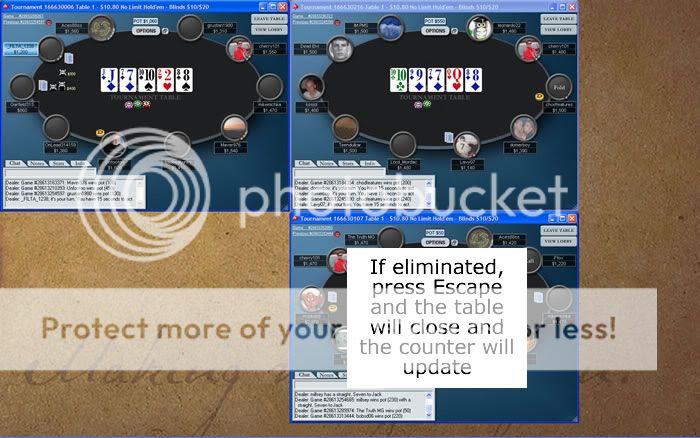
IMPORTANT NOTE: If all three slots are filled, and you press Spacebar while mousing over the main stack, the table will move to the slot with the least number of tables in. If all three slots hold an equal number of tables, the table will move to slot 1.
IMPORTANT NOTE: If all three slots are filled, and you want to move another table in the main stack to a different part of the screen, you can manually drag that table. However, to move that table back into the main stack, please use the "F1" key. This method does not confuse the script counter.
WARNING: While "MoveTable.ahk" is running, your Spacebar will obviously not work normally; you will not be able to type without spaces! We find you usually don't have time to type in the chat box or make notes while multi-tabling, so this isn't a huge issue. Should you wish to type normally, you will need to right-click on the green "H" and click "Suspend HotKeys". The icon will change to green "S", and your Spacebar will return to its normal function. If you find that you need the normal Spacebar function a lot, you can change the Spacebar hotkey to whatever key you want. How to do this is shown in the section below.
CHANGING THE MOVETABLE HOTKEY
Right-click on the "MoveTable.ahk" script, and select "Edit Script". Scroll down to the line shown in the screenshot below, and change that line to the code for the key you want to use, followed by two colons. A full list of available keycodes can be found here:
List of Keys and Mouse/Joystick Buttons for Hotkeys and Macros
So, if you want to use the Tab key instead of the Spacebar, just change
space::
to
Tab::

We have now shown you the basics of how to multi-table on Poker Stars and Full Tilt Poker. So, go forth and multiply!
|
|
|
Play for FREE and practice your game at...
Join the FTR Poker Forum to disable these banners and start posting!
|
|
rong
|
|
Full House
Join Date: Nov 2008
Location: Beachside
Posts: 1,196
|
|
Hey guys,
Haven't had a chance to read this yet but from a brief glance it looks great. Just what I was hoping you'd produce.
Now I have this, through a combination of stumbling accross too many winning regs at titan & laziness in not wanting to try to addapt this for titan, I am now gonna transfer to pokerstars.
Thanks for putting in the effort to help the rest of us. No doubt I will be boring you with silly questions some time soon.
|
Quote:
Originally Posted by Micro2Macro
hey guys, if you ever make a snap call on the river when your opponent raises you're fucking retarded.
Fucking. Retarded.
|
|
|
Extremophile
|
|
Flush
Join Date: Oct 2008
Location: Stackton
Posts: 451
|
|
Thanks for this great post. I actually had another question. I tried multitabling a few times and I placed the tables like you showed on this table. When I was trying to type something or make a bet on one table, when it is your due on another table it automatically comes up to the top and If I want to turn back to previous table I had to click 2 or 3 times on the window to keep going. However, while I was working on it another table pops up to the top. Is there a way to avoid this like prevent another table come to the top while you are working on another?
|
|
|
|
taipan168
|
|
Administrator
Administrator
Join Date: Jul 2005
Location: Sydney
Posts: 10,441
|
|
Thanks very much for all your work on this, Naka and Rage. I've added this to the SNG Tactics Digest.
|
|
|
|
dontezuma
|
|
Straight
Join Date: May 2009
Location: Catchin' fishes
Posts: 116
|
|
I can testify! It's awesome. Don't forget the Table Ninja. Mousing over tables, betting with WADS keys and cycling through stacked tables with tab under you pinky is like playing Doom or Quake or whatever the kids are playing these days (COD4?). It really brings me back.... except now I'm making money
You guys are my heroes!
|
|
|
|
Rage2100
|
|
Full House
Join Date: Jan 2007
Location: UK
Posts: 719
|
|
Quote:
|
Originally Posted by Extremophile
I tried multitabling a few times and I placed the tables like you showed on this table. When I was trying to type something or make a bet on one table, when it is your due on another table it automatically comes up to the top and If I want to turn back to previous table I had to click 2 or 3 times on the window to keep going. However, while I was working on it another table pops up to the top. Is there a way to avoid this like prevent another table come to the top while you are working on another?
|
What poker site are you playing on? Not all sites have the ability within their software to queue tables, and if this is the case, stacking will not work very well.
|
|
|
|
Extremophile
|
|
Flush
Join Date: Oct 2008
Location: Stackton
Posts: 451
|
|
Thanks for the reply Rage2100. I play on Pokerstars and not many hours a day. So, mouse will work well for me if I get rid of that problem.
|
|
|
|
caddie444
|
|
Full House
Join Date: Apr 2007
Location: constantly UTG
Posts: 722
|
|
guys, seriously, thanks
!
|

Don't complain; Just work harder - Randy Pausch (The Last Lecture)
|
|
PokerBookie
|
|
Join Date: May 2009
Posts: 21
|
|
Rage2100 first off this is a great guide you guys put together, I did have a question that maybe you can answer. When I multi-table I have to use the stacked method. When I use the tile method it just seems like 2 much is going on and it really starts to get hard to follow.
Stacked by far is the best method for me. So a while back I decided to grind out some Sngs 6-max, so I downloaded AHK and some scripts and decided to get to work. So I proceeded to put up 5 tables stacked of the 6-max Sng.
Now I did have it setup in the stars lobby as well to put the table to front when action is on me at any one of the tables. When a table came up that need action sometimes another would pop up right away, then another. (that's what you want to happen) The problem was that sometimes I would time out out on 1 table just because of the fact 3 others would come up that needed action.
Of course I was playing ABC poker and not taking long at all to fold, call, raise etc.. When a Table pops up u want to act right away. Before I noticed that I timed out and bubbled out on one of the tables, it was to late and the buy-in was lost.
So is there anyway to prevent this from happening? Or is it just acceptable for most players that multi-table to lose a buy-in here and there do to not acting on a table that was lost track of? I can not see stopping playing on 4 other tables to find out what did happen on that one table. Also if you have enough tables up u may just lose track of a table.
|
|
|
|
kstarm
|
|
Straight
Join Date: Sep 2005
Location: Minnesota
Posts: 168
|
|
After Nak's 2K post I was really interested in trying the stack. I can 8 table tile no problem but my screen can't do much more than that. I tried the stack based on those instructions and failed miserably (I think more user error then anything....) Thus this step-by-step guide was exactly what I was looking for. Thanks you two!!!
|
|
|
|
Nakamura
|
|
4-of-a-Kind
Join Date: Mar 2008
Location: Grindin'
Posts: 1,515
|
|
Quote:
|
Originally Posted by PokerBookie
Rage2100 first off this is a great guide you guys put together, I did have a question that maybe you can answer. When I multi-table I have to use the stacked method. When I use the tile method it just seems like 2 much is going on and it really starts to get hard to follow.
Stacked by far is the best method for me. So a while back I decided to grind out some Sngs 6-max, so I downloaded AHK and some scripts and decided to get to work. So I proceeded to put up 5 tables stacked of the 6-max Sng.
Now I did have it setup in the stars lobby as well to put the table to front when action is on me at any one of the tables. When a table came up that need action sometimes another would pop up right away, then another. (that's what you want to happen) The problem was that sometimes I would time out out on 1 table just because of the fact 3 others would come up that needed action.
Of course I was playing ABC poker and not taking long at all to fold, call, raise etc.. When a Table pops up u want to act right away. Before I noticed that I timed out and bubbled out on one of the tables, it was to late and the buy-in was lost.
So is there anyway to prevent this from happening? Or is it just acceptable for most players that multi-table to lose a buy-in here and there do to not acting on a table that was lost track of? I can not see stopping playing on 4 other tables to find out what did happen on that one table. Also if you have enough tables up u may just lose track of a table.
|
There are a few ways to prevent this from happening. First off, you are going to need to concentrate hard and make sure you don't miss anything. Also, make sure you have setting correct to bring up and queue tables within PokerStars. We show you how to do that in the thread.
Method 1
Just use the Spacebar on the main stack periodically and shift all the tables out of main stack and into the slots. The tables you are sitting out on should be towards the bottom of the main stack and you can click "I'm back". I used to use this method quite effectively.
Method 2
You could try another AHK script. Perhaps something like StarsAssistant might work. Rage, can you confirm this?
Method 3
Use Table Ninja, which is a commercial product, that amongst other things can automatically click "I'm back". Seriously, if you are playing the mid-stakes the couple of BI you could save could pay for this.
|
|
|
|
Nakamura
|
|
4-of-a-Kind
Join Date: Mar 2008
Location: Grindin'
Posts: 1,515
|
|
Quote:
|
Originally Posted by dontezuma
....and cycling through stacked tables with tab under you pinky is like playing Doom or Quake or whatever the kids are playing these days (COD4?).
|
COD5 ... geez, get with the program
|
|
|
|
Rage2100
|
|
Full House
Join Date: Jan 2007
Location: UK
Posts: 719
|
|
For the people who are having trouble queuing tables, please read the section, "Before You Start". The tables should then pop-up in the order they need action on.
For people playing a high number of tables, who find themselves occasionally sitting out on a table, there are scripts available to help with this problem. I believe TimeoutHelper is one, although I've never tried it. It is available at the link below, along with many other helpful scripts. Just download the ones you want.
http://www.overcards.com/wiki/moin.cgi/AutoHotKey
|
|
|
|
GatorJH
|
|
4-of-a-Kind
Join Date: Aug 2004
Location: HotLanta
Posts: 3,179
|
|
just skimmed through this and can't wait to work on setting this up. I tend to play most of my poker while sitting in a hotel room which means I am playing on my notebook.
I have never been able to play more than 4 tables because I just didn't like the tiled or cascaded tables so this looks like a great solution.
I will also be a pretty good test user for your process as I am pretty much a noob at AHK and that sort of stuff.
Nice job guys!!!!!
|
|
Poker is easy, it's winning at poker that's hard.
|
|
Warpe
|
|
Moderator
Join Date: Sep 2005
Location: Canuckistan
Posts: 3,905
|
|
Great work guys! Nice to see some solid content being contributed. 5 spades!
|
|
|
|
GatorJH
|
|
4-of-a-Kind
Join Date: Aug 2004
Location: HotLanta
Posts: 3,179
|
|
Quote:
|
Originally Posted by Warpe
5 spades!
|
agreed!!!
|
|
Poker is easy, it's winning at poker that's hard.
|
|
PokerBookie
|
|
Join Date: May 2009
Posts: 21
|
|
Thanks guys, I will look into table ninja & the TimeoutHelper script. Great information guys, this thread is a must for anyone starting to multi-table.
|
|
|
|
Sprayed
|
|
4-of-a-Kind
Join Date: Nov 2005
Location: GO BUCKS!
Posts: 3,057
|
|
I have to say, the way you explained everything was spot on. Very well done. Thanks for not explaining things in software engineer language.
|
|
|
|
kevster
|
|
Full House
Join Date: May 2006
Location: Fold City
Posts: 758
|
|
Wow, this looks very thorough.
I need to ask a potentially dumb question though - What's to stop me loading x tables and maximising them so they are all effectively stacked on top of one another? PStars will then just prompt me when a table needs my attention.
|
|
- You're the reason why paradise lost
|
|
Nakamura
|
|
4-of-a-Kind
Join Date: Mar 2008
Location: Grindin'
Posts: 1,515
|
|
Quote:
|
Originally Posted by kevster
Wow, this looks very thorough.
I need to ask a potentially dumb question though - What's to stop me loading x tables and maximising them so they are all effectively stacked on top of one another? PStars will then just prompt me when a table needs my attention.
|
Nothing. Just personal preference. I like to be able to cycle through my stack at times. You need at least one open slot in order to do this. You also need open slots if you wish to move tables out of the stack to follow the action more closely on any particular table.
If none of that interests you, then by all means size to the max and stack away!
|
|
|
|
Robb
|
|
4-of-a-Kind
Join Date: Aug 2007
Posts: 3,068
|
|
Very nice hand, guys.
|
|
|
|
Rage2100
|
|
Full House
Join Date: Jan 2007
Location: UK
Posts: 719
|
|
Quote:
|
Originally Posted by Nakamura
Quote:
|
Originally Posted by kevster
Wow, this looks very thorough.
I need to ask a potentially dumb question though - What's to stop me loading x tables and maximising them so they are all effectively stacked on top of one another? PStars will then just prompt me when a table needs my attention.
|
Nothing. Just personal preference. I like to be able to cycle through my stack at times. You need at least one open slot in order to do this. You also need open slots if you wish to move tables out of the stack to follow the action more closely on any particular table.
If none of that interests you, then by all means size to the max and stack away!
|
If all of your tables are maximised, and stacked one on top of another, you will never be able to follow the action properly on any particular table. If you raise on a couple of tables, you may act on another 5 or 6 tables before they pop to the top again. The slots allow you to move the tables, make your raises, and watch those tables more closely.
As Nakamura said, there is nothing wrong with maximising your tables and stacking one on top of another, but having the slots to move to, makes things much easier to follow.
|
|
|
|
Robb
|
|
4-of-a-Kind
Join Date: Aug 2007
Posts: 3,068
|
|
Windows VISTA question (sorry in advance!!)
I wasn't planning on using this, but it's so good I don't think I can pass it by without a real effort to use it. If I can play only one more table but be more efficient, so that I have just as much time with every decision, that's +EV. So I'm trying it.
Here's my question. I assume you must set up the AHK's to "run as administrator" like other poker software. I've tried a couple of AHK's in the past but have always had trouble getting them set up. Any tips for VISTA to make things work out better?
I'll dl the scripts tonight, set things up and report back success/failure. But thanks for such a comprehensive guide/manual - this just rocks.
|
|
|
|
Rage2100
|
|
Full House
Join Date: Jan 2007
Location: UK
Posts: 719
|
|
Quote:
|
Originally Posted by Robb
Windows VISTA question (sorry in advance!!)
I wasn't planning on using this, but it's so good I don't think I can pass it by without a real effort to use it. If I can play only one more table but be more efficient, so that I have just as much time with every decision, that's +EV. So I'm trying it.
Here's my question. I assume you must set up the AHK's to "run as administrator" like other poker software. I've tried a couple of AHK's in the past but have always had trouble getting them set up. Any tips for VISTA to make things work out better?
I'll dl the scripts tonight, set things up and report back success/failure. But thanks for such a comprehensive guide/manual - this just rocks.
|
Thanks for the comments Robb, and thanks to everyone else who has commented on this thread. It's great to get such good feedback.
We forgot all about Vista, so I'll edit the original post over the weekend. I think you will need to run AutoHotkey as administrator if you are using Vista.
1) Right-click the AutoHotkey.exe file, under C:\Program Files\AutoHotkey\ where it is installed by default. If you have a shortcut icon to AutoHotkey on your desktop, you can right-click that instead.
2) From the right-click menu, choose "Properties".
3) Click on the "Compatibility" tab.
4) At the bottom is a section called "Privilege level". Tick the box that says "Run this program as an administrator".
5) Click "Apply".
6) Click "Ok".
All scripts should now run as administrator.
Also, if using Vista, I would copy the "MoveTable.ahk" and "SetTable.ahk" scripts to a directory under your "User" section, and not to the C:\Program Files\AutoHotkey\ directory. When the ".ini" file is created, the system may need certain privileges, so your "User" section may be the best place.
Let me know how you get on Robb, and I'll edit the original post.
|
|
|
|
Robb
|
|
4-of-a-Kind
Join Date: Aug 2007
Posts: 3,068
|
|
Thanks, Rage, I'm working on dl's and install in the next hour - I'll update when I get it working (hopefully).
|
|
|
|
Robb
|
|
4-of-a-Kind
Join Date: Aug 2007
Posts: 3,068
|
|
Quote:
|
Originally Posted by Robb
Thanks, Rage, I'm working on dl's and install in the next hour - I'll update when I get it working (hopefully).
|
Yep, it's working (including the lack of space bar functionality when you forget to shut it down - like just now :P ). I'm gonna try it out for a sesh tonight and report back. I think it's just phenomenal.
Edit: All right, I typically play X tables, and tonight I was playing X + 3 tables successfully with these scripts (at one level lower than my current playing stakes). I'll be dropping back to X + 1 to get used to the table configuration and management at my current stakes. Then possibly increase tables. Some things I noticed:
1. This setup is extremely functional, and I suggest anyone who plays more than 4 tables try it.
2. I used HEM, and the stats shift seamlessly with the tables, taking just a split second to readjust their position.
3. Full Tilt isn't great about re-forcing tables to the top. If you hit the space bar to move a table back in the stack when another table is "active" on top of the stack, you can end up timing out.
4. You can "dig" in the main stack by moving all the tables to the slots, to find any table that is timing out.
5. Having the tables stacked is nice since all the buttons are exactly under your cursor. It makes all your actions in the stack very straightforward. But the same is true for the slots. Each of the slots works like a mini-stack, so you can actually play it like 4 stacks, just shifting things around the main stack however is needed.
|
|
|
|
Kijjo
|
|
Flush
Join Date: Sep 2008
Location: Alabama
Posts: 554
|
|
Excellent stuff. This is the kind of work that puts FTR at the top.
|
|
Donk Skills:
#1 The bluff call
#2 The Drawing-Dead Value Bet
__________________________________________________ _____________
"What we do in life echoes in eternity."
Maximus Decimus Meridius - Gladiator
|
|
Rage2100
|
|
Full House
Join Date: Jan 2007
Location: UK
Posts: 719
|
|
Quote:
|
Originally Posted by Robb
3. Full Tilt isn't great about re-forcing tables to the top. If you hit the space bar to move a table back in the stack when another table is "active" on top of the stack, you can end up timing out.
|
Personally, I don't play at Full Tilt, but maybe Nakamura has some ideas on this issue.
Quote:
|
Originally Posted by Robb
4. You can "dig" in the main stack by moving all the tables to the slots, to find any table that is timing out.
|
I think it's a good idea to do this. I do it on Stars, but have not had a table time out on me yet, luckily.
|
|
|
|
Robb
|
|
4-of-a-Kind
Join Date: Aug 2007
Posts: 3,068
|
|
Quote:
|
Originally Posted by Rage2100
Quote:
|
Originally Posted by Robb
3. Full Tilt isn't great about re-forcing tables to the top. If you hit the space bar to move a table back in the stack when another table is "active" on top of the stack, you can end up timing out.
|
Personally, I don't play at Full Tilt, but maybe Nakamura has some ideas on this issue.
Quote:
|
Originally Posted by Robb
4. You can "dig" in the main stack by moving all the tables to the slots, to find any table that is timing out.
|
I think it's a good idea to do this. I do it on Stars, but have not had a table time out on me yet, luckily.
|
I switched to having my taskbar on the left side of the screen so there's a tab for each table (rather than a single tab you have to click to see all the Full Tilt windows). Now I can cycle through the table in the stack by left-clicking the flashing tabs.
Full Tilt gets "confused" when you take an action on a table other than the one it "pops" into the front of the queue. So you have to (sometimes) take action quickly on 3 blinking tables until you "find" the one it wants you to play. Once you click an action there, it's back on track.
By the way, I've gotta know this: did y'all program these scripts? or find them and write a guide for them? NH either way, but if you made these scripts yourselves, ZOMFG awesome.
|
|
|
|
Nakamura
|
|
4-of-a-Kind
Join Date: Mar 2008
Location: Grindin'
Posts: 1,515
|
|
Quote:
|
Originally Posted by Robb
Full Tilt gets "confused" when you take an action on a table other than the one it "pops" into the front of the queue. So you have to (sometimes) take action quickly on 3 blinking tables until you "find" the one it wants you to play. Once you click an action there, it's back on track.
|
I must say I tested this quite briefly on Full Tilt, as I'm normally on Stars. Stars has a similar issue when you playing on tables and a new one opens. It automatically forces it way to the top and can lead to one timing out on tables it you don't move it to an open slot. However, the queuing process should be maintained underneath the newly opened table.
I can't think of any quick fix for this, other than to make sure "Display table on Action" is ticked in the Main Lobby -> Options. Otherwise I guess you are just going to have to manually find the table (I have to occassionally do this on Stars too when it forces another table to the top for no apparent reason).
Quote:
|
Originally Posted by Robb
By the way, I've gotta know this: did y'all program these scripts? or find them and write a guide for them? NH either way, but if you made these scripts yourselves, ZOMFG awesome.
|
Rage2100 found an AHK script that moved tables around. Rage then pandered to my annoying requests and learned AHK to write this code from scratch. Awesome, huh?
|
|
|
|
revolvingiris
|
|
Full House
Join Date: Jul 2008
Posts: 1,139
|
|
This is really cool guys, thanks!
|
|
|
|
Rage2100
|
|
Full House
Join Date: Jan 2007
Location: UK
Posts: 719
|
|
Quote:
|
Originally Posted by Nakamura
Quote:
|
Originally Posted by Robb
By the way, I've gotta know this: did y'all program these scripts? or find them and write a guide for them? NH either way, but if you made these scripts yourselves, ZOMFG awesome.
|
Rage2100 found an AHK script that moved tables around. Rage then pandered to my annoying requests and learned AHK to write this code from scratch. Awesome, huh?
|
We were going through a really quiet spell at work, so I decided to learn AHK instead of being bored. Well, may as well get paid to learn it. 
I'd recommend that everyone try and learn it, even if you just learn the basics. You can do loads of cool stuff with it, not just poker stuff. I've written a few little scripts now, that I use to help myself out. A good start to learning is here:
http://www.autohotkey.com/docs/
|
|
|
|
Robb
|
|
4-of-a-Kind
Join Date: Aug 2007
Posts: 3,068
|
|
Quote:
|
Originally Posted by Nakamura
Quote:
|
Originally Posted by Robb
Full Tilt gets "confused" when you take an action on a table other than the one it "pops" into the front of the queue...
|
I must say I tested this quite briefly on Full Tilt, as I'm normally on Stars. Stars has a similar issue when you playing on tables and a new one opens. It automatically forces it way to the top and can lead to one timing out on tables it you don't move it to an open slot. However, the queuing process should be maintained underneath the newly opened table.
I can't think of any quick fix for this, other than to make sure "Display table on Action" is ticked in the Main Lobby -> Options. Otherwise I guess you are just going to have to manually find the table (I have to occassionally do this on Stars too when it forces another table to the top for no apparent reason).
|
Odd thing - I switched from Layout 2 to Layout 1, and the queueing problem went mostly away. It seems FT doesn't like stacking tables in the bottom right of your screen. I had some trouble getting my main stack to STAY put in the bottom-right. FTRP would move the stack an inch to the left when I closed and then opened the poker client. Weird.
Anyway, "confused queueing" in the main stack is almost never a problem in Layout1, and I think it's Full Tilt, not your script, that's fokt. You hit the space bar on a slotted table, and it slips back into the stack "under" the active table. And the table open / table close almost never results in confusion. The active table reappears after about 1.5 seconds.
I'm now playing X + 2 tables at my current stakes and thinking about each hand just as much as I was before, imo. And I know there's efficiency gains ahead as I get better at moving tables and tracking what action/reads are where. I think I'll probably get to X + 3 and max out. I don't like playing too many tables. But these scripts just expand your personal bandwidth by making game management more efficient.
Nice work.
|
|
|
|
Nakamura
|
|
4-of-a-Kind
Join Date: Mar 2008
Location: Grindin'
Posts: 1,515
|
|
Quote:
|
Originally Posted by Robb
Odd thing - I switched from Layout 2 to Layout 1, and the queueing problem went mostly away. It seems FT doesn't like stacking tables in the bottom right of your screen.
|
Admittedly, I run config 1 and this is why I probably didn't notice anything was amiss on FTP. It's very strange indeed that FTP would have trouble stacking the games in the bottom right, however it's good that you managed to solve the issue.
Rage2100, you need to add this bug to the thread.
|
|
|
|
Robb
|
|
4-of-a-Kind
Join Date: Aug 2007
Posts: 3,068
|
|
Quote:
|
Originally Posted by Nakamura
Quote:
|
Originally Posted by Robb
Odd thing - I switched from Layout 2 to Layout 1, and the queueing problem went mostly away. It seems FT doesn't like stacking tables in the bottom right of your screen.
|
Admittedly, I run config 1 and this is why I probably didn't notice anything was amiss on FTP. It's very strange indeed that FTP would have trouble stacking the games in the bottom right, however it's good that you managed to solve the issue.
Rage2100, you need to add this bug to the thread.
|
I don't think it's a bug - if you leave the taskbar on the bottom, Full Tilt seems to play nicely with AHK, i.e. Layout #2 works fine. I like my taskbar on the left so each table has its own tab (one additional way to see which table needs attention and avoid time-outs). If you move the taskbar to the left side, Full Tilt won't stack tables in the bottom-right correctly. When you reopen Tilt, the tables are an inch too far to the left. I think Full Tilt gets confused about the active window when the task bar isn't on the bottom.
Anyway, Rage's script works 99.9% of the time in Layout #1, so maybe the Tilt solution is just to use that one.
|
|
|
|
Roller
|
|
Straight
Join Date: May 2009
Posts: 168
|
|
OMG that is Insane .
WOW
Very Cool.
Awesome job.
You guys Rock .......................
Thanks
|
|
|
|
Rage2100
|
|
Full House
Join Date: Jan 2007
Location: UK
Posts: 719
|
|
Original post edited to include notes for Vista users.
|
|
|
|
lNormajean
|
|
3-of-a-Kind
Join Date: Feb 2009
Posts: 103
|
|
THIS.IS.THE.NUTS
|
|
|
|
Sprayed
|
|
4-of-a-Kind
Join Date: Nov 2005
Location: GO BUCKS!
Posts: 3,057
|
|
Does anyone know how I can find the right x and y coordinates on my monitor without using the set-up?
|
|
|
|
Rage2100
|
|
Full House
Join Date: Jan 2007
Location: UK
Posts: 719
|
|
Quote:
|
Originally Posted by Sprayed
Does anyone know how I can find the right x and y coordinates on my monitor without using the set-up?
|
Yes, if you want to find out the co-ordinates of existing windows, there is a program that is installed with AutoHotkey that can help you.
Click the main "Start" button on Windows, click "All Programs", and under the "AutoHotkey" directory is a program called "AutoIt3 Window Spy". Load this up, click on any window that you want information about, and it all pops up in the little box.
|
|
|
|
ranDMC
|
|
Join Date: Jan 2008
Posts: 24
|
|
IF you do in fact want to use your spacebar while playing,
you can right click on the "H" in the system icons, click on "Edit This Script"
- look for the only place in the code where it says "space::CoordMode"
and change "space" to "LShift" (left shift key) or "LCtrl" (left control), or whatever you would like to change it to on this key list:
http://www.autohotkey.com/docs/KeyList.htm
personally i do other things on my computer while im playing, although minimally.
hope that helps!
|
|
|
|
ranDMC
|
|
Join Date: Jan 2008
Posts: 24
|
|
also you must save the file in notepad,
close the movescript.ahk file,
and right click on the "H" again in the system tray and click on "Reload this Script"
|
|
|
|
Sprayed
|
|
4-of-a-Kind
Join Date: Nov 2005
Location: GO BUCKS!
Posts: 3,057
|
|
Quote:
|
Originally Posted by Rage2100
Quote:
|
Originally Posted by Sprayed
Does anyone know how I can find the right x and y coordinates on my monitor without using the set-up?
|
Yes, if you want to find out the co-ordinates of existing windows, there is a program that is installed with AutoHotkey that can help you.
Click the main "Start" button on Windows, click "All Programs", and under the "AutoHotkey" directory is a program called "AutoIt3 Window Spy". Load this up, click on any window that you want information about, and it all pops up in the little box.
|
ah you are the shit sir
|
|
|
|
Rage2100
|
|
Full House
Join Date: Jan 2007
Location: UK
Posts: 719
|
|
Quote:
|
Originally Posted by ranDMC
IF you do in fact want to use your spacebar while playing,
you can right click on the "H" in the system icons, click on "Edit This Script"
- look for the only place in the code where it says "space::CoordMode"
and change "space" to "LShift" (left shift key) or "LCtrl" (left control), or whatever you would like to change it to on this key list:
http://www.autohotkey.com/docs/KeyList.htm
personally i do other things on my computer while im playing, although minimally.
|
I'll try and add a section into the original post about this when I get chance.
|
|
|
|
kmind
|
|
Straight Flush
Join Date: Oct 2006
Location: Not Giving In
Posts: 4,240
|
|
Seems like FTR hasn't had a nice long post like this in a little bit. Great going, guys!
|
|
|
|
Robb
|
|
4-of-a-Kind
Join Date: Aug 2007
Posts: 3,068
|
|
The new FTP update has rendered the AHK "move table" script ineffective. You can still use the setup script. I haven't had much time to play lately, but I'll update if I can find any way to make them again.
FTP has this history of releasing "updates" which render their software almost useless, then re-releasing an update that fixes most of the problems. This time, they had their software so screwed up the mouse scroll button wasn't working to increase bet amounts, but a re-update fixed that. I'm hoping they undo some of the other "fixes" too.
|
|
|
|
Nakamura
|
|
4-of-a-Kind
Join Date: Mar 2008
Location: Grindin'
Posts: 1,515
|
|
Quote:
|
Originally Posted by Robb
The new FTP update has rendered the AHK "move table" script ineffective. You can still use the setup script. I haven't had much time to play lately, but I'll update if I can find any way to make them again.
FTP has this history of releasing "updates" which render their software almost useless, then re-releasing an update that fixes most of the problems. This time, they had their software so screwed up the mouse scroll button wasn't working to increase bet amounts, but a re-update fixed that. I'm hoping they undo some of the other "fixes" too.
|
Hmm, sorry it's tough to keep on this as my connection with Full Tilt is usually so bad I just can't play there. The code itself is very 'basic' (well, the commands anyway) and it's likely that only the window class name has changed slightly.
Robb, could you open a FTP table and use the 'Window Spy' in AHK. We need the ahk_class window name. I would do it myself, but I noticed the download is quite large and I'm trying to preserve my internet cap. Once we fix the window class it should be fine .... now if only they would sort out the queuing process.
|
|
|
|
Rage2100
|
|
Full House
Join Date: Jan 2007
Location: UK
Posts: 719
|
|
Quote:
|
Originally Posted by Nakamura
Quote:
|
Originally Posted by Robb
The new FTP update has rendered the AHK "move table" script ineffective. You can still use the setup script. I haven't had much time to play lately, but I'll update if I can find any way to make them again.
FTP has this history of releasing "updates" which render their software almost useless, then re-releasing an update that fixes most of the problems. This time, they had their software so screwed up the mouse scroll button wasn't working to increase bet amounts, but a re-update fixed that. I'm hoping they undo some of the other "fixes" too.
|
Hmm, sorry it's tough to keep on this as my connection with Full Tilt is usually so bad I just can't play there. The code itself is very 'basic' (well, the commands anyway) and it's likely that only the window class name has changed slightly.
Robb, could you open a FTP table and use the 'Window Spy' in AHK. We need the ahk_class window name. I would do it myself, but I noticed the download is quite large and I'm trying to preserve my internet cap. Once we fix the window class it should be fine .... now if only they would sort out the queuing process.
|
I don't have Full Tilt installed, but what Nakamura said, is the most likely explanation for the script not working. If I know the "ahk_class" for the new Full Tilt tables, I can easily change the code.
|
|
|
|
Robb
|
|
4-of-a-Kind
Join Date: Aug 2007
Posts: 3,068
|
|
Quote:
|
Originally Posted by Rage2100
Quote:
|
Originally Posted by Nakamura
Quote:
|
Originally Posted by Robb
The new FTP update has rendered the AHK "move table" script ineffective. You can still use the setup script. I haven't had much time to play lately, but I'll update if I can find any way to make them again.
FTP has this history of releasing "updates" which render their software almost useless, then re-releasing an update that fixes most of the problems. This time, they had their software so screwed up the mouse scroll button wasn't working to increase bet amounts, but a re-update fixed that. I'm hoping they undo some of the other "fixes" too.
|
Hmm, sorry it's tough to keep on this as my connection with Full Tilt is usually so bad I just can't play there. The code itself is very 'basic' (well, the commands anyway) and it's likely that only the window class name has changed slightly.
Robb, could you open a FTP table and use the 'Window Spy' in AHK. We need the ahk_class window name. I would do it myself, but I noticed the download is quite large and I'm trying to preserve my internet cap. Once we fix the window class it should be fine .... now if only they would sort out the queuing process.
|
I don't have Full Tilt installed, but what Nakamura said, is the most likely explanation for the script not working. If I know the "ahk_class" for the new Full Tilt tables, I can easily change the code.
|
Had family in town over weekend and leave to tonight on a business trip to Wash. DC. I will try to get this done, but it may be a day or two. I still haven't packed, and it'll be time to leave in like 3 hours. :P
|
|
|
|
Robb
|
|
4-of-a-Kind
Join Date: Aug 2007
Posts: 3,068
|
|
Here is the screen shot of the spy when a FTP cash game table was open and active:
Edit: removed screen shot because it had my sn, and rage and naka already accessed needed info.
I'm slowly learning enough that, sooner or later, I'll just learn to write my own scripts. Until then, I really appreciate any help y'all can provide.
BTW, FTP has just issued their 2nd revision of the "big" upgrade, so now the mouse scroll button works again. Much more of this and I'm gonna trying to get my roll over to Starz :P
|
|
|
|
Latest Poker News
|
|
KoRnholio
|
05-26-2012, 03:08 PM Australia Legalized Online Poker coming up in next 6 to 12 Months
|
|
According to an email sent out by Mark Bryan, a gaming analyst at Merrill Lynch, the Australian government plans to legalize online poker sometime in the next six to 12 months. This move will coincide ...
|
| Thread Tools |
|
|
| Display Modes |
Linear Mode
|
Posting Rules
|
You may not post new threads
You may not post replies
You may not post attachments
You may not edit your posts
HTML code is Off
|
|
|
All times are GMT. The time now is 06:29 AM.
|